We have completely redesigned the Podpage audio player from the ground up, and we think you're going to love it.
The old player was functional, but let's be honest — it looked dated. Compared to players from Transistor, Buzzsprout, Captivate, and RedCircle, it was falling short on the design front. That changes today.
A Premium New Look
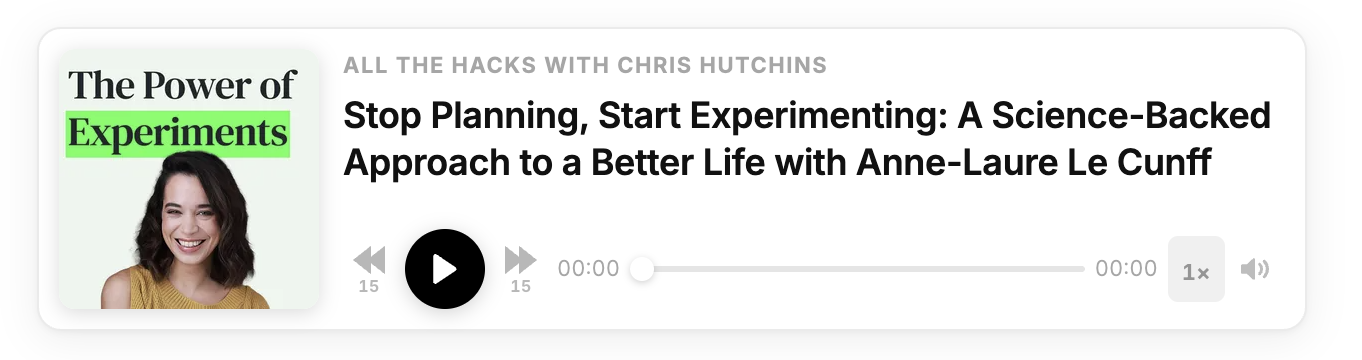
The new player is a clean, modern white card with two columns: your episode artwork on the left and everything else — podcast name, episode title, and controls — on the right. The layout is compact but spacious, and the proportions feel intentional. It looks at home on any page you embed it on.
Controls are laid out in a single row: skip back 15 seconds, play, skip forward 15 seconds, a timestamp, the scrubber, duration, playback speed, and mute. Everything is right there — no hunting around.
The play button uses your podcast's primary color automatically, so the player always feels on-brand. Dark mode is fully supported too.
On mobile, the layout gracefully collapses — the artwork steps aside and the controls expand to fill the full width, making it just as easy to use on a phone as on desktop.
Clickable Chapters and Timestamps
One of the biggest advantages of the Podpage player is what happens when you add chapters and timestamps to your episodes. When a listener is reading your episode page and you reference a moment in the episode — say, "at 12:30 we dive into the story" — that timestamp becomes a clickable link. One tap and the player jumps right to that spot.
The same goes for chapters: if you've added chapter markers to your episode, they show up as navigable sections. Listeners can jump directly to the part they care about most, which keeps them engaged longer.
No other embed player on Podpage can do this — it only works with the Podpage player because the player and the page are built together.
Available Now for Every Podpage Site
The new player is available to every Podpage site right now. Just go to Episodes → Settings and choose to use the Podpage Audio player. Your embedded players will automatically reflect the new design.
We're really proud of how this turned out, and we think it brings Podpage up to — and in some ways past — the best players out there. Give it a look and let us know what you think.


